
My Engineering Years: this post is from my early hands-on infrastructure days, kept for reference. See the rest of this era.
In this example the syntax used is the “Checkpoint” method.
FileZilla
Open FileZilla
Edit–>Settings…–>FTP–>FTP Proxy–>Click Custom–>Enter the syntax below:
USER %u@%s@%h
PASS %p@%w
Fill in the following:
Proxy Host – 123.123.123.123
Proxy User – NTID
Proxy Pass – NTPass
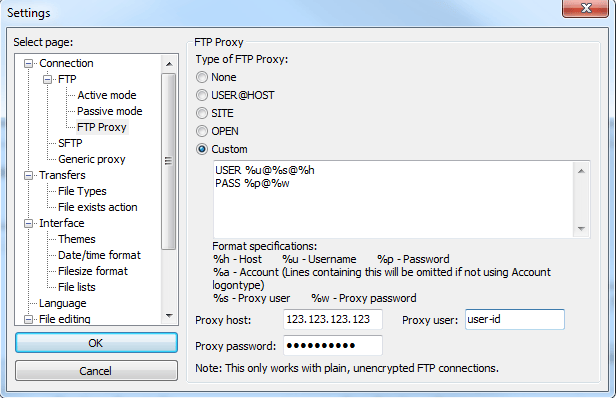
Click OK to get to the main screen again.
Fill in the following:
Host: – ftp.server-u-need-2-get-2.com
Username – username on ftp server
Password – password on ftp server
Port – leave blank

Click Quickconnect, and you should be passing the BlueCoat authentication, and logging into the server now.
In this example the syntax used is the “Raptor” method.
Instructions and Screenshots to come……..